
If you're having trouble logging into your account on the SkySlope product suite, this guide walks you through the most common issues and how to resolve them. Take a look at the list of common issues below and click on an issue to jump to the troubleshooting steps.
Common Login Issues
- Logging into the Wrong Portal
- Multi-Factor Authentication (MFA) Issues
- Too Many Failed Login Attempts
- Single Sign-On (SSO) Issues
Logging into the Wrong Portal
Issue:
If you are attempting to log onto the wrong portal, you may see this error message:
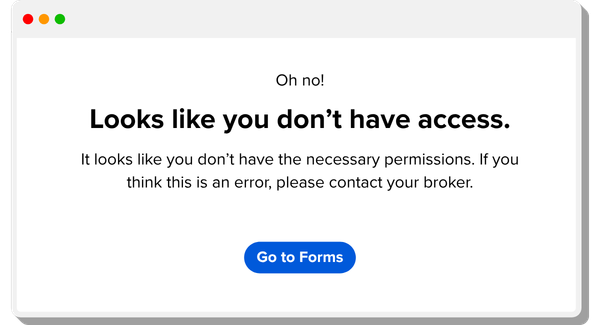
You will only see this message if your account only has access to SkySlope Forms, not SkySlope Transaction Management, and you attempted to log into the Transaction Management portal.
Solution:
Navigate to the correct portal by clicking Go to Forms (in the error message) or by clicking here. If you believe you should not be seeing this message and that you should have access to SkySlope Transaction Management, please contact our Support team.
Multi-Factor Authentication (MFA) Issues
Issue:
When attempting to log in with Multi-Factor Authentication (MFA), one common issue is not receiving the MFA prompt or code.
Solution:
If you're still logged into your account, we'd recommend re-enrolling in MFA. Navigate to accounts.skyslope.com
and then go to the Security tab, where you can re-enroll in MFA.
If you continue to have trouble with MFA, please contact our Support team.
Too Many Failed Login Attempts
Issue:
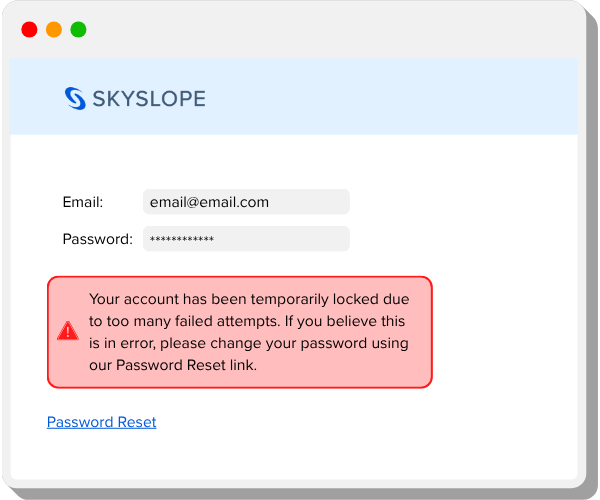
If you have attempted to log in to your account with the wrong email address and/or password too many times, you will see this message and be temporarily locked out of your account:
Solution:
If you've been temporarily locked out of your account, you can either wait until the lockout period ends and try to log in again, or you can Password Reset to reset your password. Learn more about resetting your password.
Single Sign-On (SSO) Issues
Issue:
If you usually log into your MLS or Association and click on a SkySlope button to access SkySlope, you are logging in with an SSO. If you're having trouble logging in with an SSO, or you are able to log in but your account appears empty or missing files, there may be a discrepancy between your MLS/Association and your SkySlope account. This can happen if your login ID or email address for your MLS/Association account has been changed.
Solution:
If you are having trouble logging in via SSO, or you have logged in but your account is missing files, please contact our Support team.
Was this article helpful?
That’s Great!
Thank you for your feedback
Sorry! We couldn't be helpful
Thank you for your feedback
Feedback sent
We appreciate your effort and will try to fix the article