
Customizable Fields Based on Representation Type
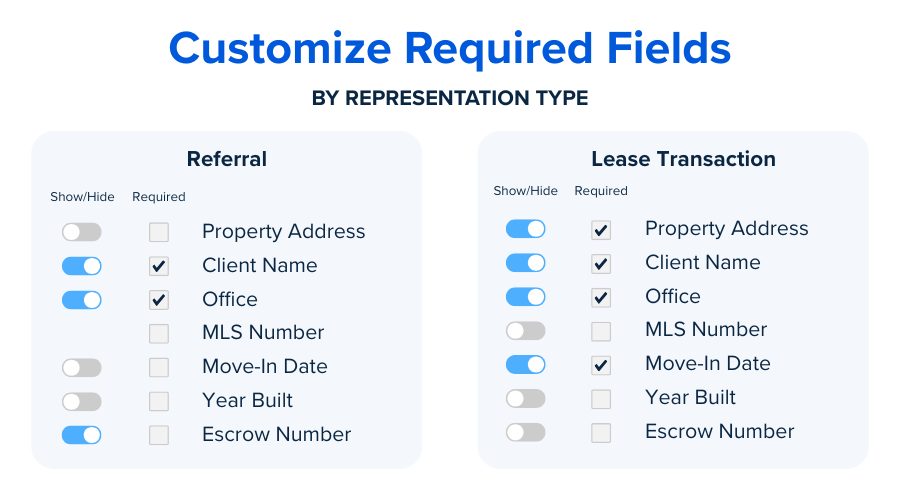
The information that must be collected can vary depending on the file’s representation type (e.g., Buyer Rep or Seller Rep). For example, the information required when a Buyer’s Agent closes a deal may differ from what’s needed for a Listing Agent. To accommodate this, you can customize which fields are required or optional for each representation type.
Representation Types
Before we dive into which fields can be customized, here is the list of different Representation types available in SkySlope:
- Listing File Types
- Listing: Representing only the seller.
- Lease Landlord: Representing only the landlord.
- Transaction File Types
- Purchase: Representing only the buyer.
- Both Purchase & Listing: Representing the seller and the buyer.
- Lease Tenant: Representing only the tenant.
- Both Lease Tenant & Landlord: Representing the tenant and the landlord.
- Referral: Documenting referral deals.
- BPO: Broker price opinion.
- Other
Customizable Fields Based on Representation Type
Your brokerage can control whether a field is shown or hidden, and whether it’s required or optional, based on the representation type (listed above). For example, you could make the Year Built field required for a Purchase Transaction, but not for a Lease Transaction. Please note that your brokerage will work with a SkySlope Customer Success Manager to make these changes to your account.
Here is a list of fields that can be customized:
- Listing Contacts:
- Seller, Referral Agent
- Transaction Contacts:
- Seller, Buyer, Agent on the Other Side, Escrow Company, Title Company, Attorney/Firm, Lender, Transaction Coordinator, Referral Agent
- MLS Number
- Sale Price
- Year Built
- Source
- Escrow Number
- APN
- Acceptance Date
- Closing Date
- Sale Commission
- Listing Commission
- Brokerage Earnest Money Y/N (Deposit Amount, Date of Check, etc.)
- Size
- Price per Square Foot
- Renewal Option
- Purchase Option
- Commencement Date
- Ending Date
- Monthly Rent Amount
- Move-in Date
To configure your required details to best fit your brokerage's workflow, please reach out to your SkySlope Customer Success Manager.
Was this article helpful?
That’s Great!
Thank you for your feedback
Sorry! We couldn't be helpful
Thank you for your feedback
Feedback sent
We appreciate your effort and will try to fix the article